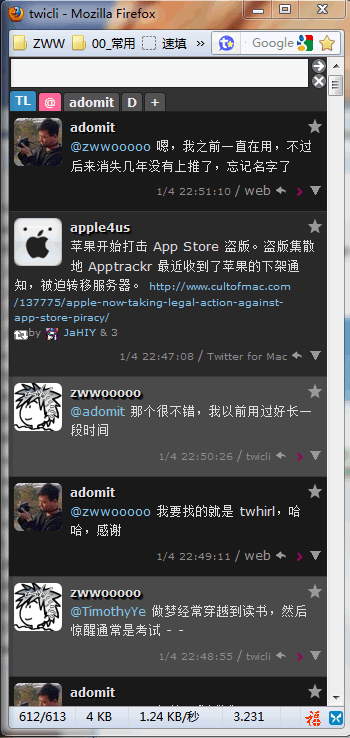
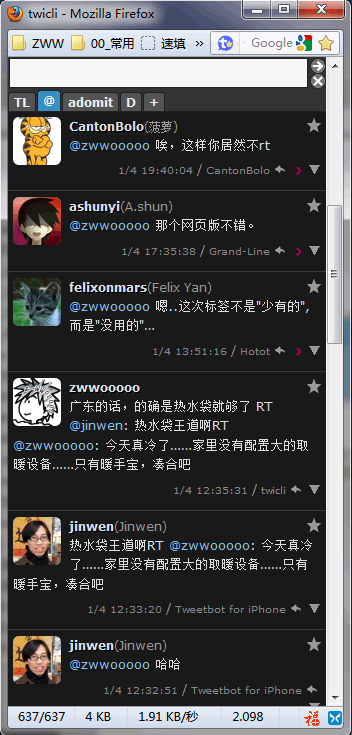
最近转用 Twicli,默认界面就不吐槽了,我用的是 Twicli 官方 wiki 网站找到的 twhirl 风格的界面css,但是推的界面我还是喜欢黑色风格,所以昨天下午自己动手配置了一个 TweetDeck 风格的 Twicli 界面,效果如下:
Timeline样式:
@Reply样式:
共享吧,如果你也在用 Twicli,刚好你也喜欢这个风格,那么按照下面设置吧
css源码: Version 1 用下面的 2012.01.08 版本2吧
@charset "utf-8";
 /* ----- twicli.css ----- */
 * {
     margin: 0;
     padding: 0;
     line-height: 1.5;
     /* IE独自拡張 */
     zoom: 1;
 }
 body {
     background: none;
 }
 img {
     border-width: 0;
     vertical-align: bottom;
 }
 a {
     text-decoration: none;
 }
 input,textarea {
     border: 1px solid #222;
     background-color: #fafafa;
     color: #000000;
 }
 input[type="button"],
 input[type="image"] {
     margin: 1px 2px;
 }
 input[type="image"] {
     position: relative;
     bottom: -6px;
     padding-top: 1px;
 }
 ul,li,dl,dt,dd {
     list-style-type: none;
     list-style-position: outside;
 }
 li img,a img {
     display: inline;
 }
 /* フォント設定 */
 *, #menu a, #tw, #tw2 {
     color: #999;
     font-size: 12px;
     font-weight: normal;
     font-style: normal;
     font-family: Verdana, "Simsun", sans-serif;
 }
 /* 上部投稿欄 */
 #control {
     border-bottom: 1px solid #222;
     background-color: #333;
 }
 #fst {
     padding: 1px;
     font-size: 12px;
     letter-spacing: 1px;
 }
 /* ボタン類 */
 #go, #rst {
     border: 1px solid #222;
     /* 角丸 */
     border-radius: 8px;
     /* Firefox独自拡張 */
     -moz-border-radius: 8px;
     background-color: #bababa;
 }
 /* 文字数カウンタ */
 #counter-p1, #counter-p2 {
     display: none;
 }
 #counter {
     background-color: #666666;
     font-size: 12px;
     font-family: Verdana, "Simsun", sans-serif;
     font-style: normal;
     font-weight: bold;
 }
 /* タブ設定 */
 #menu a {
     margin: 0 1px 1px 0;
     padding: 0px 5px;
     border-color: #222;
     /* 角丸 */
     border-top-left-radius: 3px 3px;
     border-top-right-radius: 3px 3px;
     background-color: #555;
     color: #eee;
     font-weight: bold;
 }
 /* 選択しているタブ */
 #menu a.sel {
     background-color: #378fc4;
     color: #f4f4f4;
     margin-bottom:1px;
 }
 /* 更新されたタブ */
 #menu a.new {
     background-color: #ff6699;
     font-weight: bold;
 }
 /* ブロック全体の背景 */
 #tw, #tw2 {
     background-color: #292929;
 }
 #tw > div {
     border: none;
 }
 /* ステータスブロック */
 .tw-parent > div > div {
     clear: both;
     padding: 0.5em 0 0.5em 5px;
     border-bottom: 1px solid #383838;
     /* 発言の背景画像のURL指定
     background: transparent url(bg_tw.png) repeat-x left top; */
 }
 /* TLのアイコン */
 .uicon {
     display: block;
     width: 48px;
     height: 48px;
     margin: 0 8px 5px 0;
     padding: 0;
     background-color: #999;
     border-radius:6px;
     -moz-border-radius:6px;
     -webkit-border-radius:6px;
 }
 /* スクリーンネーム */
 .uid {
     color: #dedede;
     font-weight: bold;
     text-shadow: 1px 1px 0 #000,2px 2px 0 #111,3px 3px 0 #222;
 }
 /* ユーザ名 */
 .uname {
     color: #999;
 }
 /* 鍵アイコン */
 .lock {
     position: relative;
     top: -3px;
     left: 3px;
 }
 /* ふぁぼ */
 .fav {
     position: relative;
     /* right: 3px;
     padding-left: 0.5em; */
     right:-16px;
     padding-left: 20px;
     background:url(icon_star_empty.png) no-repeat 0 0;
     cursor:pointer;
 }
 .fav:hover {
     background:url(icon_star_empty_hover.png) no-repeat 0 0;
 }
 /* ツイート本文 */
 .status {
     display: block;
     margin-right: 10px;
     font-size:13px; /* zww */
     color:#dedede;
 }
 .rtinfo,.rtinfo a,.rtinfo small{
     font-size:10px !important;
 }
 /* ステータス領域内のリンク */
 a, .status a.link, .prop a {
     border: none;
     background: none;
     color: #87c2ed;
 }
 /* オンマウス */
 a:hover, .status a.link:hover {
     background: none;
     text-decoration: underline;
 }
 /* 投稿時刻、via等 */
 .utils {
     display: block;
     margin: 0.5em 0;
 }
 .prop {
     clear: both;
 }
 /* font-size: smallerを打消 */
 .prop,
 .prop a {
     font-size: 10px;
     color:#888;
 }
 .prop,
 .utils .button {
     position: relative;
     right: -10px;
 }
 .utils .button:hover {
     text-decoration:none;
 }
 /* 元の画像を非表示に */
 .utils .reply{
     display:inline-block;
     width:14px;
     height:14px;
     background:url(reply.png) no-repeat 0 0;
 }
 .utils .reply:hover{
     background:url(reply_hover.png) no-repeat 0 0;
 }
 .utils .button img{
     opacity: 0;
     position: relative;
     top: -3px;
     width: 12px;
     height: 12px;
 }
 .utils .inrep img{
     opacity: 50;
 }
 /* スラッシュ */
 .separator {
     color: #999;
 }
 /* リツイートした人のアイコン */
 .rtuicon {
     width: 12px;
     height: 12px;
     margin: 0 5px 0 0;
     vertical-align: bottom;
 }
 /* ポップアップ */
 .popup {
     margin-left: -7px;
     margin-right: 15px;
     padding: 0;
 }
 .popup small {
     color: #999;
 }
 .popup small:hover {
     color: #fff;
 }
 #popup {
     border: 1px solid #222;
     background-color: #333;
     font-size:12px;
 }
 #popup a {
     border-bottom: 1px dotted #191919;
     background-color:#999;
     color:#191919;
     font-size:12px;
 }
 #popup a#translate_status {
     border: none;
 }
 #popup a:hover {
     color: #191919;
     background-color: #dedede;
 }
 #popup hr {
     display: none;
 }
 /* 自分の発言 */
 .fromme {
     background-color: #494949;
 }
 /* 自分宛のリプライ */
 #tw > div > div.tome,
 #re > div > div {
     background-color: #191919;
 }
 /* in_reply_to */
 #rep {
     padding: 0 0 0.5em 7px;
     border: 1px solid #191919;
     /* 発言の背景画像のURL指定
     background: #ffffff url(bg_tw.png) repeat-x left top; */
     background-color: #292929;
     box-shadow:1px 1px 6px #999,-1px -1px 6px #999;
     -moz-box-shadow:1px 1px 6px #999,-1px -1px 6px #999;
     -webkit-box-shadow:1px 1px 6px #999,-1px -1px 6px #999;
 }
 #rep hr {
     border:1px solid #383838;
     margin-bottom:5px;
 }
 #rep .fav {
     right:-216px;
     padding-left: 220px;
 }
 .emp {
     background-color: #494949;
 }
 /* DM */
 #tw2c > div > div.tome {
     background-color: #292929;
 }
 /* 続きを読むリンク */
 .get-next {
     padding: 1px 0;
     background-color: #555;
     color: #dedede;
     font-weight: bold;
 }
 /* プロフィール */
 #user_info {
     margin: 0;
     padding: 5px;
     border: none;
     border-bottom: 1px solid #383838;
 }
 #user_info td {
     padding-right: 5px;
     vertical-align: top;
     font-size: 12px;
 }
 /* プロフィールのアイコン */
 .uicon2 {
     width: 48px;
     height: 48px;
 }
css用到我修改/新做的几个图片,为了防止盗链,我还是把css文件和图片打了个包
下载地址:Google Code | 115 下载下面的 2012.01.08 版本2吧
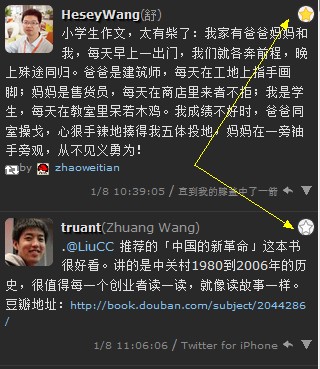
2012.01.08 Update:修正“收藏”按钮样式bug,因为此图片是用js改变其地址的,原图片是在浅背景用的,我用隐藏此图片+新制作的图片作为背景处理,但问题就是点击“收藏”后不会改变图片状态……So,改为如下图样式(即加个浅色背景,继续使用官方图片)
CSS源码:Version 2
@charset "utf-8";
 /* ----- twicli.css ----- */

 * {
     margin: 0;
     padding: 0;
     line-height: 1.5;
     /* IE独自拡張 */
     zoom: 1;
 }

 body {
     background: none;
 }

 img {
     border-width: 0;
     vertical-align: bottom;
 }

 a {
     text-decoration: none;
 }

 input,textarea {
     border: 1px solid #222;
     background-color: #fafafa;
     color: #000000;
 }

 input[type="button"],
 input[type="image"] {
     margin: 1px 2px;
 }

 input[type="image"] {
     position: relative;
     bottom: -6px;
     padding-top: 1px;
 }

 ul,li,dl,dt,dd {
     list-style-type: none;
     list-style-position: outside;
 }

 li img,a img {
     display: inline;
 }

 /* フォント設定 */
 *, #menu a, #tw, #tw2 {
     color: #999;
     font-size: 12px;
     font-weight: normal;
     font-style: normal;
     font-family: Verdana, "Simsun", sans-serif;
 }

 /* 上部投稿欄 */
 #control {
     border-bottom: 1px solid #222;
     background-color: #333;
 }

 #fst {
     padding: 1px;
     font-size: 12px;
     letter-spacing: 1px;
 }

 /* ボタン類 */
 #go, #rst {
     border: 1px solid #222;
     /* 角丸 */
     border-radius: 8px;
     /* Firefox独自拡張 */
     -moz-border-radius: 8px;
     background-color: #bababa;
 }

 /* 文字数カウンタ */
 #counter-p1, #counter-p2 {
     display: none;
 }

 #counter {
     background-color: #666666;
     font-size: 12px;
     font-family: Verdana, "Simsun", sans-serif;
     font-style: normal;
     font-weight: bold;
 }

 /* タブ設定 */
 #menu a {
     margin: 0 1px 1px 0;
     padding: 0px 5px;
     border-color: #222;
     /* 角丸 */
     border-top-left-radius: 3px 3px;
     border-top-right-radius: 3px 3px;
     background-color: #555;
     color: #eee;
     font-weight: bold;
 }

 /* 選択しているタブ */
 #menu a.sel {
     background-color: #378fc4;
     color: #f4f4f4;
     margin-bottom:1px;
 }

 /* 更新されたタブ */
 #menu a.new {
     background-color: #ff6699;
     font-weight: bold;
 }

 /* ブロック全体の背景 */
 #tw, #tw2 {
     background-color: #292929;
 }
 #tw > div {
     border: none;
 }

 /* ステータスブロック */
 .tw-parent > div > div {
     clear: both;
     padding: 0.5em 0 0.5em 5px;
     border-bottom: 1px solid #383838;
     /* 発言の背景画像のURL指定
     background: transparent url(bg_tw.png) repeat-x left top; */
 }

 /* TLのアイコン */
 .uicon {
     display: block;
     width: 48px;
     height: 48px;
     margin: 0 8px 5px 0;
     padding: 0;
     background-color: #999;
     border-radius:6px;
     -moz-border-radius:6px;
     -webkit-border-radius:6px;
 }

 /* スクリーンネーム */
 .uid {
     color: #dedede;
     font-weight: bold;
     text-shadow: 1px 1px 0 #000,2px 2px 0 #111,3px 3px 0 #222;
 }

 /* ユーザ名 */
 .uname {
     color: #999;
 }

 /* 鍵アイコン */
 .lock {
     position: relative;
     top: -3px;
     left: 3px;
 }

 /* ふぁぼ */
 .fav {
     position: relative;
     right: 3px;
     margin-left:0.5em;
     background:#f2f2f2;
     cursor:pointer;
     border:1px solid #383838;
     border-radius:8px;
     -moz-border-radius:8px;
     -webkit-border-radius:8px;
 }

 /* ツイート本文 */
 .status {
     display: block;
     margin-right: 10px;
     font-size:13px; /* zww */
     color:#dedede;
 }

 .rtinfo,.rtinfo a,.rtinfo small{
     font-size:10px !important;
 }

 /* ステータス領域内のリンク */
 a, .status a.link, .prop a {
     border: none;
     background: none;
     color: #87c2ed;
 }

 /* オンマウス */
 a:hover, .status a.link:hover {
     background: none;
     text-decoration: underline;
 }

 /* 投稿時刻、via等 */
 .utils {
     display: block;
     margin: 0.5em 0;
 }

 .prop {
     clear: both;
 }

 /* font-size: smallerを打消 */
 .prop,
 .prop a {
     font-size: 10px;
     color:#888;
 }

 .prop,
 .utils .button {
     position: relative;
     right: -10px;
 }

 .utils .button:hover {
     text-decoration:none;
 }

 /* 元の画像を非表示に */
 .utils .reply{
     display:inline-block;
     width:14px;
     height:14px;
     background:url(reply.png) no-repeat 0 0;
 }
 .utils .reply:hover{
     background:url(reply_hover.png) no-repeat 0 0;
 }
 .utils .button img{
     opacity: 0;
     position: relative;
     top: -3px;
     width: 12px;
     height: 12px;
 }
 .utils .inrep img{
     opacity: 50;
 }

 /* スラッシュ */
 .separator {
     color: #999;
 }

 /* リツイートした人のアイコン */
 .rtuicon {
     width: 12px;
     height: 12px;
     margin: 0 5px 0 0;
     vertical-align: bottom;
 }

 /* ポップアップ */
 .popup {
     margin-left: -7px;
     margin-right: 15px;
     padding: 0;
 }

 .popup small {
     color: #999;
 }

 .popup small:hover {
     color: #fff;
 }

 #popup {
     border: 1px solid #222;
     background-color: #333;
     font-size:12px;
 }

 #popup a {
     border-bottom: 1px dotted #191919;
     background-color:#999;
     color:#191919;
     font-size:12px;
 }

 #popup a#translate_status {
     border: none;
 }

 #popup a:hover {
     color: #191919;
     background-color: #dedede;
 }

 #popup hr {
     display: none;
 }

 /* 自分の発言 */
 .fromme {
     background-color: #494949;
 }

 /* 自分宛のリプライ */
 #tw > div > div.tome,
 #re > div > div {
     background-color: #191919;
 }

 /* in_reply_to */
 #rep {
     padding: 0 0 0.5em 7px;
     border: 1px solid #191919;
     /* 発言の背景画像のURL指定
     background: #ffffff url(bg_tw.png) repeat-x left top; */
     background-color: #292929;
     box-shadow:1px 1px 6px #999,-1px -1px 6px #999;
     -moz-box-shadow:1px 1px 6px #999,-1px -1px 6px #999;
     -webkit-box-shadow:1px 1px 6px #999,-1px -1px 6px #999;
 }
 #rep hr {
     border:1px solid #383838;
     margin-bottom:5px;
 }
 .emp {
     background-color: #494949;
 }

 /* DM */
 #tw2c > div > div.tome {
     background-color: #292929;
 }

 /* 続きを読むリンク */
 .get-next {
     padding: 1px 0;
     background-color: #555;
     color: #dedede;
     font-weight: bold;
 }

 /* プロフィール */
 #user_info {
     margin: 0;
     padding: 5px;
     border: none;
     border-bottom: 1px solid #383838;
 }

 #user_info td {
     padding-right: 5px;
     vertical-align: top;
     font-size: 12px;
 }

 /* プロフィールのアイコン */
 .uicon2 {
     width: 48px;
     height: 48px;
 }
Version 2 下载地址:Google Code
----------------------------寂-寞-分-割-线------------------------------
简单设置方法:
1. 把下载到的压缩包解压上传到你的网站,这里假如是放到根目录下的 twicli 文件夹里面,如果是我的网站就是 https://zww.me/twicli,而 css 的地址就是 https://zww.me/twicli/twicli_tweetdeck.css
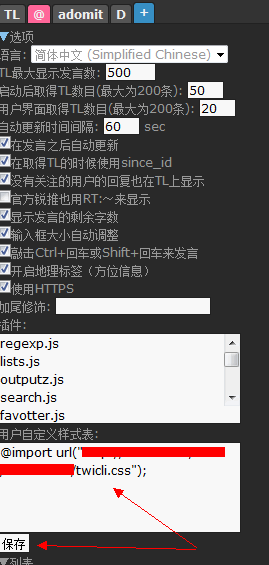
2. 打开 twicli 的网页客户端,点击“+”进行设置,如下图:
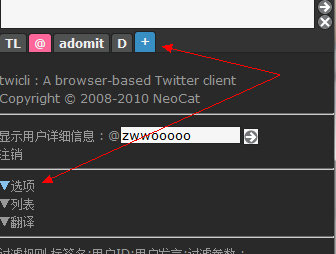
3. 继续看下图吧,第一个箭头里面(自定义样式)填入
@import url("https://zww.me/twicli/twicli_tweetdeck.css");
----------------------------寂-寞-分-割-线------------------------------
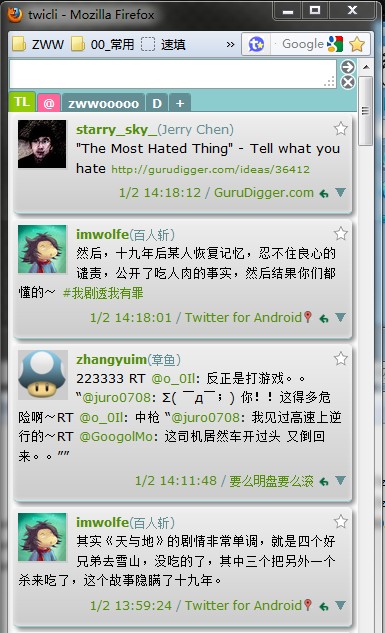
附 twhirl 风格样式,这是 twicli 官方 wifi 网站找到的,我稍微修改了一下,另外配合官方的圆角阴影css效果不错
下载:Google Code | 115
PS:配合官方圆角阴影css的自定义样式框内容这样写(下面的红色部分网址是例子)
@import url(styles/round.css);
@import url("https://zww.me/twicli/twicli_twhirl.css");
twhirl + 圆角阴影效果图
- 本文标题:Twicli界面DIY:TweetDeck风格
- 本文链接:https://zww.me/archives/25564
- 发布时间:2012年01月05日 10:19
- 版权声明:除非注明,文章均为 zwwooooo 原创,转载请以链接形式标明本文地址!

相当好,!正在使用中!
这个,。。没玩过。
@朱定聪
需要才去折腾
Z大。你代码高亮用的是哪一款?我挑花眼了。
@zoe
我没用用这类插件,我的是最原始的直接html……
没有用推特的小白....0,0
@heson
都没去用,小白啥?哈
@错误者
微博都不玩,哪里会用过?
拿走,om 威武
我也准备弄个推特了,可以随心所欲的唠叨!
@Kayo
嗯,说话不用过滤
没用过,虽然在墙外,但是还是用weibo
@Dongyan
我相反,虽然在墙内,但只用twitter