前几天写了个代码方式实现的 Recently Updated Posts,有朋友说他不会添加进 sidebar.php,虽然可以直接复制粘贴,但是不能随意调整显示位置。
于是……我今天抽空做了个插件:WP-RecentlyUpdatedPosts Widget,这算是我第一次做插件吧,需要的朋友拿去折腾,也许会提交到 WP 官网,看时间吧。
WP-RecentlyUpdatedPosts Widget 插件激活后是以小工具方式显示最近修改更新过的一些老文章,让访者知道你更新了文章内容,方便查看关注。适合一些需要不定期更新内容的文章,如下载资源、开源项目发布等共享类文章。
Plugin name: WP-RecentlyUpdatedPosts Widget
Version: 0.1
Author: zwwooooo
features:
- 可以自定义最近修改的文章数量
- 自定义排除多少天内的新文章(默认排除7天内的新文章)
- 数据库缓存方式,更新/修改文章/设置小工具时更新缓存。
Download: Google code | WordPress.org
Install:
- 把 wp-recentlyupdatedposts-widget.0.1.zip 上传到 /wp-content/plugins 目录下并解压
Optional: 直接去“WP后台 》插件 》安装插件 》上传 - 去“WP后台 》插件”激活插件 WP-RecentlyUpdatedPosts Widget
- 然后去“WP后台 》外观 》小工具”,找到小工具“最近更新的文章”,拉到右边的小工具栏即可。
PS: 如果你不想以插件方式,那么可以打开插件文件 recently-updated-posts.php,把第10行后面的代码扔到你所用主题的 functions.php 里面即可!
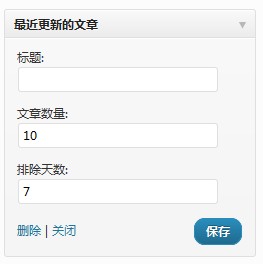
效果见我博客侧边栏的“Recently Updated Posts”
zww
赏

oooo
or
- 本文标题:WordPress Plugin: WP-RecentlyUpdatedPosts Widget
- 本文链接:https://zww.me/archives/25490
- 发布时间:2011年07月31日 18:16
- 版权声明:除非注明,文章均为 zwwooooo 原创,转载请以链接形式标明本文地址!
你这个主题看起来真好。
这么好的东东居然在我眼下晃过去了很多次!!以前以为是其他的东东呢,现在马上去用上。。
@。潇
霍霍,需要的还是比较有作用的
嘿嘿,如果博客上有项目更新页面的话会很有用滴。
@小邪
就是这样才想到滴
你好, plugin好像有個小問題, 如果是Sticky post, 它好像永遠排第一, 請問可以如何解決? 謝謝!
@City25
加个判断吧,recently-updated-posts.php里找到
if (current_time('timestamp') - get_the_time('U') > 60*60*24*$days) {
	$i++;
	$the_title_value=get_the_title();
	$wp_rup_by_zww.='<li><a href="'.get_permalink().'" title="'.$the_title_value.'">'
	.$the_title_value.'</a><span class="updatetime"> ('
	.get_the_modified_time('Y-m-d').')</span></li>';
}
在其上面加个判断,改为如下:
if (current_time('timestamp') - get_the_time('U') > 60*60*24*$days) { $i++; if (!is_sticky()) { $the_title_value=get_the_title(); $wp_rup_by_zww.='<li><a href="'.get_permalink().'" title="'.$the_title_value.'">' .$the_title_value.'</a><span class="updatetime"> (' .get_the_modified_time('Y-m-d').')</span></li>'; } }hoho, 俺是WP新手, 不是很會它的函數.
感謝z大!
@City25
慢慢折腾
拿去扒掉不介意吧。。
@阿邙
不介意,不要用着代码又说是自己原创就行了,哈
大佬 下载不了啊
比较老... 这里可以找到代码
大佬请问如何去掉时间显示呢。
@MechanicF 要么css隐藏掉,要么修改插件代码删掉时间显示